Thursday, July 7, 2011

Google PLUS !!! Just beginner or much more to Get

Getting Started
Just visit to http://google.com/+/ and register Urself

Gmail is required to make the Registration and if u dont have Gmail then u can get via http://mail.google.com


Just when i joined Google+, I literally spent whole day on it exploring


Create Your Circles:

Circles are like grouping people and Following them like on Twitter.You can make separate circles for friends, family and colleagues, then at the same time you can add one person in all the circles.


Photos:
Just like Facebook you can add photos, videos, or links to your posts.If you own an android phone then there is an app which directly loads the photos from mobile to your Plus account and makes it a private album, you can decide when to share it and with whom.

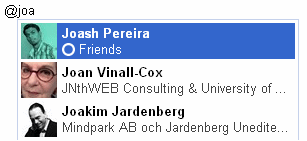
To mention people in your Posts, Just add + or @ in front of their name.


Hangouts

Hangouts is the coolest feature of Google Plus, it will let you start a video conversation with as many friends of yours as you like.

Simply click the “Hangout” button available on right sidebar or visit this plus.google.com/hangouts

You’ll be taken to a "green room" where you can select circles or individuals to add in your room (video chat).


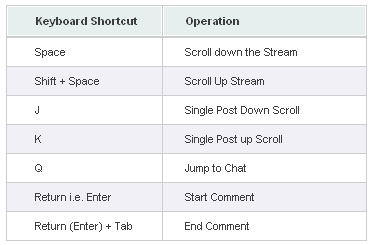
Keyboard Hot-keys:


Turning Off Email Alerts

By default, Google+ will email you for every post, comment, +1 or anything that happens and is related to you.This may irritate you . You can simply which off by going to the GooGle+ setting from option menu. so just un-check the boxes and You are Done


Missing Facebook?

If u are missing the Facebook on GooglePlus, the Blue Navigation and all the other Outlook of the facebook .
Webdevelopers have gave the solution to that. According to Userstyles they have shared the link, for those who Miss Facebook interfrence on GooglePlus.

Simply go to http://userstyles.org/styles/50051/google-facebook and follow the two step tutorial.

Here is the view of GooglePlus after installing the script.


I Spend my day understanding what GooGlePlus was, and share Peek view of Beginner Look at Google Plus.

Google is Further adding Games ,event and many other. Google have already said that Plus is Ambitious project to them and Its Rival Facebook have to Reconsider it Policy.

NOTE:
In Google+ you cannot send Private messages to people. The only way to do so is by sharing your post with them privately. Make sure you disable Re-share option for that post, because the person with whom you are sharing can Re-share it.

Feel Free to share any comment

Sunday, December 5, 2010

Highly Recommended Marketing Tools That Are FREE!

7 Zip:
http://7-zip.org (free download)
An open source, free alternative to WinZip.

Adobe Reader:
http://get.adobe.com/reader (free download)
Used to view and print PDF files.

Audacity:
http://audacity.sourceforge.net (free download)
An open source software used for recording & editing audio files.

AVG: http://free.avg.com (free download)
Anti-virus and anti-spyware protection.

BrowserShots:
http://browsershots.org (free online tool)
Use this site to view how your website look in various browsers.

CamStudio:
http://camstudio.org (free download)
Lets you record all screen & audio activity on your computer and create video files.

CCleaner: http://ccleaner.com (free download)
Removes unused files from your pc allowing Windows to run faster and freeing up space.

Color Cop: http://colorcop.net (free online tool)
A multi-purpose color picker - great for web designers and programmers.

Down For Everyone: http://downforeveryoneorjustme.com (free online tool)
Is your site down? Use this tool to see if your website is down for other people.

DupeFree: http://dupefreepro.com (free download)
Quickly check for duplicate content & LSI keywords.

Evernote:
http://evernote.com (free download)
Scan your notes, receipts, etc … it will OCR the content, sace it, and make it searchable)

FileZilla:
http://filezilla-project.org (free download)
Open source FTP program for uploading files to your host.

Firefox: http//mozilla.com/firefox (free download)
Alternate web browser.

GIMP: http://gimp.org (free download)
An open source program used to create & edit - free alternative to Photoshop.

Give Away Of The Day:
http://giveawayoftheday.com (free download)
Unique site that offers you a free license digital product daily.

Google Gmail & Analytics:
http://mail.google.com (free download)

Kompozer:
http://kompozer.net (free download)
An easy to use WYSIWYG HTML editor.

Launchy: http://launchy.net (free download)
Opens your documents, project files, folders, and bookmarks with just a few keystrokes .

NicheBot Classic:
http://nichebotclassic.com (free online tool)
Online keyword research tool helps you target the correct keywords.

Open Office:
http://openoffice.org (free download)
Open source office suite software - word processing, spreadsheets, databases, presentations ...

OSWD: http://oswd.org/ (free downloads)
Open Source Web Design offers free web design templates.

PDF995:
http://pdf995.com (free download)
Use this tool to easily convert files to PSD format.

PDF to Word Converter:
http://pdftoword.com (free online tool)
Easily create editable Word Doc files from PDF content – for legit purposes only! :-)

Pixie:
http://nattyware.com/pixie.php (free download)
Great for web designers - just point to a color and it will tell you the code value for that color.


Roboform:
http://roboform.com (free download)
Easily & safely manage your passwords.

ScreenHunter:
http://wisdom-soft.com/sh/sh_free.htm (free download)
Software that allows you to “capture” any part of your desktop, a window or full screen.

ShortKeys:
http://shortkeys.com (free download)
Allows you to set up replacement text or paragraphs for any user defined keystrokes.

Skype:
http://skype.com (free download)
Make free calls over the internet to other people on Skype.

SpyBot:
http://safer-networking.org (free download)
Effectively detects and removes spyware from your PC.

Textpad:
http://textpad.com (free download)
A powerful text editor. I personally like Textpad for editing HTML code.

TimeLeft:
http://nestersoft.com/timeleft (free download)
A countdown, reminder, clock, alarm clock, stopwatch, timer, & web countdown tool.

Tweet Deck: http://tweetdeck.com (free download)
Great for staying in touch with your contacts across Twitter, Facebook, MySpace and more.

VLC Media Player: http://videolan.org/vlc (free download)
Media player capable of reading most audio and video formats.

powerful content for money-making Blog...

You will be writing many pages of your site. So the first thing you need to do is create a structure of pages is to write. Site architecture diagram shows the family tree. At the top is a single page, the homepage. Directly related to the home page of the second-level pages. These are usually the main site. Under each category pages are pages of the third level. For example, the site dedicated to sports, the home page would be about sport. At the second level, one of the category pages should be about race. Under the category page would be a third level pages focused on Formula One, Indy Car racing, drag racing and so on.


How many pages of second and third level should not be? There are no rules, but may begin to address the main, ten pages of the second level and third level of ten pages for each page of the second level. It& like a family tree where everyone has ten children. That gives you 111 pages in total. That, because 100 pages is about the minimum number of pages for a website based on content that is a good passive income. If this seems a lot, do not worry. You do not have to write it all at once. All work on a structure that provides its readers to find all the information they want.

For the first step, give your home page and each of the ten pages of the second degree, first. Draw on paper or with a mind mapping tool. Now take the titles of the preliminary pages and use a tool like Wordtracker to find relevant phrases that are in heavy demand among readers, but for which there is a relatively small supply of quality web pages exist. 

For example, you could have written a preliminary title of a second level page in a site of aromatherapy essential oils of your hand, but five minutes with Wordtracker will tell you that you will probably get more search engine traffic if you change Title: The Hand of aromatic essential oil blend to go through this process any page on the site. Optimize each page for search engines. This ensures that the time you get a ton of traffic from organic search engine to your site.


When you have a clean, well-organized structure of your site and you know what clauses used to optimize each page, time to start writing for the readers. While search engine optimization is a necessity when you want a lot of traffic, you can finally get the Site or not depending on the quality of the content. Make sure that every page is useful and informative. Write so that people interests and concerns of their answers to common questions. For example, you can answer the question, And safe use of essential oils and face cream?

Money making how and where.

Everyone can use a couple extra bucks in your pocket. That's the kind of thing that many people think that all the time. In this world trying to economic turmoil, it is always about doing enough to earn a living. There is also the idea that more money creates a better life. The main thing is that jobs in the world are not really answer the growing need for more money. They are simply paying the same rate they have given birth for many years in the past. This creates a problem for those who are struggling with rising costs and increasing needs that may occur. We have to see how you can make more money. This is something that has to do with inspiration and ambition as a whole. You must be the kind of person who is willing to take life by the horns and carry out their own agenda. No one else will. As a person, you have to move forward.

Start showing the basics. Each article published on this site is intended as a manual for the new person involved in the money. You will not find much technical jargon here. All information is intended for the reader who is well advanced or beginner. There is nothing that I left out. This site is packed with comprehensive resources to teach you how to make money. You do not need to be a college graduate or similar. All you need is the desire to succeed and willingness to move forward. Our knowledge will do the rest and give you the foundation you need. Check back often as we continue to update this site regularly to provide a better service.

Sunday, February 21, 2010

Wednesday, September 30, 2009

Pulling the Fat from Foods with LipoBIND

LipoBIND - Fat blocker made from natural dried cactus extract. While reducing fat intake is certainly associated with dieting, it is also among the goals of those with perfectly healthy weights who take LipoBIND. Fat is one of the more dangerous elements of food and, though our bodies require a certain amount of it to function correctly, the amounts contained in many of the most popular dishes are far in excess of what's needed and what's healthy. Reducing this fat intake can have significant effects on one's overall health and, fortunately, this goal can be accomplished with the use of entirely natural ingredients which are safe for the vast majority of individuals.

LipoBIND is made out of cactus leaves. The substances contained in these leaves bind with fat. When the two merge, they create a sort of gel of dietary fiber and fat which is passed harmlessly from the body along with any other waste. This can reduce the amount of fat that one receives from their food by as much as 27 percent, according to the manufacturer's literature. There are other ways in which LipoBIND is designed to make losing weight easier and more convenient than it tends to be otherwise.

LipoBIND helps to control one's appetite. Most appetite problems are caused by sharp peaks and valleys in one's blood glucose levels. When the levels plummet, the body will demand food and this can make it exceedingly difficult for one to stick to their diet program. LipoBIND helps keep the body's glucose levels regular which allows individuals to enjoy the sensation of being satisfied by a meal for longer and reduces the risk of one indulging a bit too much when they become hungry and, thus, ruining all the work they put toward reducing their weight in the first place.

It is recommended that one takes a vitamin supplement along with LipoBIND. The company offers its own line of supplements to go along with their LipoBIND product. Because the substances in the supplement will bind with the vitamin, it's not recommended to take a dosage of LipoBIND for 2 hours after having taken one's vitamins. This supplement is taken after meals when the materials in LipoBIND can bind with what food is in the stomach and ensure that the total amount of fat intake is not absorbed by the body. This also helps the body digest more slowly, reducing further the rate at which hunger returns.

LipoBIND is used by some individuals as a means of maintaining their already healthy weight as well as by those who need to lose weight in the short term. When it's used as a preventative supplement, the dosages are a bit different and all of this information is detailed on the manufacturer's literature. There are ceiling amounts which should be taken in the course of a day and one should adhere to these recommendations to ensure the best results and to ensure their overall health. This supplement is not recommended for those who are currently pregnant or nursing.

more info at Weight Loss. True Story Blog

Thursday, August 13, 2009

How To Transfer Sms From Your Mobile To Pc

Do you have a many of SMS messages, some of important value? Do you need to backup your SMS from your phone to pc and vice versa? I found third party software for Windows based Mobile Phone to transfer SMS to your desktop computer. Here is the user’s guide (3 main Steps)
1. Download the third party software and Install it
2. Transfer the SMS from your mobile to PC
3. Restore SMS from pc to mobile

1.Download the third party software and Install it
Step 1 Download the SMS transfer tool
Step 2: Unzip the file you downloaded just now and copy the installation file "GodswMobileSMSTransferSetup.CAB" to your mobile device. You may need to connect your device to a host computer using ActiveSync. You can also transfer the file using a memory card.
Step 3: On your device, navigate to the location of the CAB file using File Explorer. Click on the CAB file (displayed as the following screenshot below) and click "install" to begin the installation.

2. Transfer the SMS from your mobile to PC
Now let’s use the software to finish the transfer job.
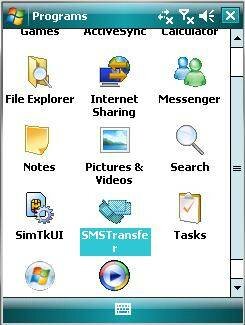
Step 1: Click "start" and then select programs.
Step 2: Select the “SMSTransfer” in your mobile programs list to run it.
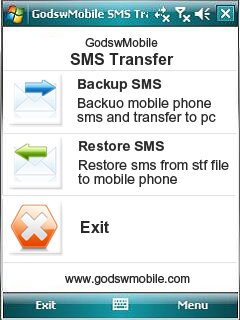
Step 3: Click on "Backup Messages" in the main interface to backup you SMS messages in mobile phone. You will see the follow screenshot give below


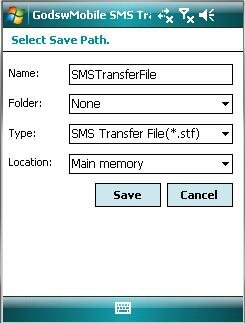
4: Decide the file name, file format and location (The default setting is OK) for your SMS file and click on "Save" to start to backup process. You can follow the screen shot below

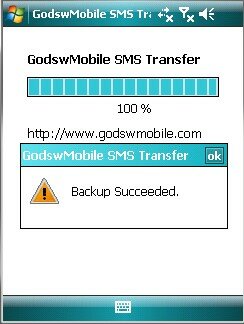
Step 5: After backup finishes, all the SMS messages has been backup in a file on your phone. You can save it in your memory card for future use or move it to your computer easily by ActiveSync.

3. Restore SMS from pc to mobile
Before backup, the mobile phone doesn't have any messages as a brand new phone.
follow the screen shot below


Step 1: Click on "SMS Transfer" in programs list to run it.
follow the screen shot below


Step 2: Click on "Restore Messages" in the main interface to save your SMS messages into mobile phone.
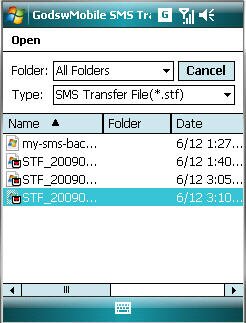
follow the screen shot

Step 3: click on the stf file to be restored.


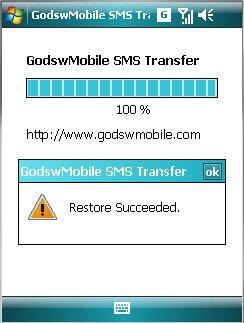
After Restore Succeed. You will see all you message to your phone now!